Frequently asked questions
Everything you want to know about Ledger Botje, the MCP connection between Exact Online and AI assistants like ChatGPT, Copilot and Claude.
No questions found. Try different search terms.
General
Ledger Botje is an MCP connection (Model Context Protocol) that lets you control Exact Online from AI assistants like ChatGPT, Microsoft Copilot, Claude, Gemini, Mistral, Perplexity, Grok, Cursor and OpenClaw. You can ask questions about your accounting, create orders, manage inventory and more using natural language.
MCP stands for Model Context Protocol. It is an open standard that enables AI assistants to securely communicate with external systems like Exact Online. Via MCP, the AI can retrieve up-to-date data and perform actions in your administration.
Ledger Botje is suitable for anyone who uses Exact Online and works daily with orders, inventory or customer data. Think of warehouse workers, purchasers, salespeople, financial staff and business owners. You don't need any technical knowledge to work with Ledger Botje.
With Ledger Botje you don't need to click through menus and screens. You simply ask your AI assistant a question in plain language and get an immediate answer. You can also combine multiple tasks in one conversation, such as "find all open orders from customer X and create a purchase order for the missing items".
Ledger Botje works with all AI assistants that support the MCP protocol: ChatGPT (OpenAI), Microsoft Copilot, Claude (Anthropic), Google Gemini, Mistral AI, Perplexity, Grok (xAI), Cursor and OpenClaw. New AI tools with MCP support automatically become compatible.
Yes, you can connect Ledger Botje to multiple AI assistants simultaneously. For example, use ChatGPT on your desktop and Copilot on your phone. Each assistant has access to the same Exact Online data via MCP.
Ledger Botje focuses on Exact Online for Trade, Manufacturing, Projects and Accounting. Do you use Exact Online Bouw (Construction)? Then there is our sister product BouwBotje, built specifically for the construction sector. Feel free to contact us if you are unsure which version fits your environment.
Features & usage
Ledger Botje supports a wide range of Exact Online modules: sales orders, purchase orders, inventory management, warehouse transfers, production orders (shop orders), goods receipts and deliveries, batch and serial numbers, customer and supplier management, assembly orders, bills of material, sales returns and more. We are continuously expanding the functionality.
Yes, with the Advanced plan you can create and edit data such as orders, warehouse transfers, goods receipts and customer accounts. With the Basic plan you can only query data (read-only).
Yes, with the Advanced plan Ledger Botje can create and edit data in Exact Online (orders, deliveries, warehouse transfers and more). By default, however, writing is turned off: the connection starts in read-only mode. To write to Exact Online, go to Settings → MCP - AI Integration, tick the "Read and write" checkbox under "MCP write access" and click Save:

As long as this checkbox is unticked, the AI assistant can only query data. Once you enable it and save, the write tools appear and the AI can write to Exact Online on your behalf. You can switch back to read-only at any time.
As long as this checkbox is unticked, the AI assistant can only query data. Once you enable it and save, the write tools appear and the AI can write to Exact Online on your behalf. You can switch back to read-only at any time.
Yes, Ledger Botje shows stock levels per warehouse and per storage location. You can ask questions like "how much of item A1001 is in the Utrecht warehouse?" or "in which locations is batch BN-2024-001 stored?".
Yes, Ledger Botje fully supports batch and serial number tracking. You can query the complete history of a batch or serial number, including all transactions such as receipts, deliveries, transfers and production.
Yes, you can look up production orders, view their status, inspect operation steps, issue materials, report completions and register time on operations. You can also query bills of material.
Yes, you can ask the AI to create overviews of, for example, outstanding invoices, inventory movements or order status. Combine Ledger Botje with ChatGPT's Code Interpreter to directly generate Excel files or charts.
Yes. Ledger Botje works on a secured, synchronized copy of your Exact Online data so answers are fast. With every question Ledger Botje checks whether the relevant data is still current; if not, it is refreshed live from Exact Online before you get your answer. Anything the AI creates or changes is written straight back to Exact Online and read back immediately. In practice you therefore work with up-to-date figures. That keeps large administrations fast too, where a direct API integration runs into the Exact Online daily limits. Only when the daily Exact Online API budget is exhausted may an answer briefly fall back to the most recently synchronized data.
Ledger Botje is not a financial advisor. Do not ask the AI for tax advice, tax calculations or business-critical decisions. Ledger Botje provides access to your data and performs actions in Exact Online, but interpreting financial data and making business decisions always remains your responsibility.
Be as specific as possible. When using multiple administrations, always mention the administration name. Use concrete values such as customer names, item codes or dates. Instead of "show invoices", ask "which sales invoices from customer Bakkerij Jansen are still open?". Break complex questions into steps for better results.
Yes, always check the AI's output before making decisions. AI assistants can make mistakes when interpreting data. When in doubt, ask for invoice numbers or order numbers so you can verify in Exact Online.
Installation & technical
After creating your account, click "Connect with Exact Online". You are redirected to Exact Online where you log in and grant permission. Ledger Botje uses OAuth2, the same secure method Exact Online itself uses. Connecting takes less than a minute.
In ChatGPT, go to Settings, choose "MCP servers" and add a new server. Copy the MCP URL from your Ledger Botje dashboard and paste it into ChatGPT. After authorization you can immediately ask questions about your Exact Online administration.
No, Ledger Botje runs entirely in the cloud. You do not need to install any software, plugins or extensions. All you need is a web browser and an AI assistant that supports MCP.
The complete setup takes less than 5 minutes: create an account, connect Exact Online and add the MCP server to your AI assistant. After that you can immediately ask your first question.
Ledger Botje is itself an MCP server that implements the Model Context Protocol. This is the standard through which AI assistants communicate. You don't need to write API calls; the AI assistant does this automatically via the MCP protocol.
The Ledger Botje MCP server uses Streamable HTTP as transport protocol. Authentication is done via OAuth 2.1 with PKCE for maximum security.
Yes, depending on your plan you have 5,000 (Basic) or 8,000 (Advanced) requests per month. Ledger Botje also respects the Exact Online API rate limits. When a temporary limit is reached, the request is automatically retried.
Yes. You can decide per MCP connection which tools are available to your AI assistant. This is useful because some AI clients can only handle a limited number of tools at once – Microsoft Copilot (Copilot Studio), for example, supports a maximum of 70 tools. In that case, make a selection of the tools you actually want to use. You set this via Settings → MCP - AI Integration, and it can be configured separately per MCP connection:

Tick the tools you want on or off and save. The selection applies only to that specific MCP connection, so you can use a different tool profile per AI assistant:
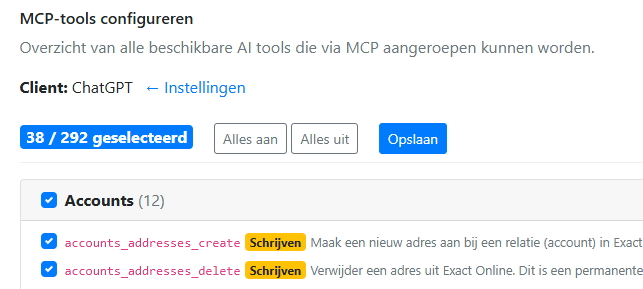
This keeps Copilot within its limit and gives each assistant exactly the tools you need.
Tick the tools you want on or off and save. The selection applies only to that specific MCP connection, so you can use a different tool profile per AI assistant:
This keeps Copilot within its limit and gives each assistant exactly the tools you need.
Check the following: (1) are you using the correct MCP URL from your Ledger Botje dashboard? (2) Does your AI client meet the requirements – ChatGPT, for example, requires a paid plan with Developer Mode, and Copilot Studio can use a maximum of 70 tools at once (select them in the settings). (3) Did you click "Approve" during connection to grant access? (4) Do you only see read tools? Write tools only appear after you enable write access. (5) Did it stop working after a while? Reconnect; your access may have expired. See the Connect MCP page for step-by-step instructions or contact us.
You can reach us via the contact form; we usually respond within one business day. On business days we are also available by phone during office hours. We provide support in Dutch and English. For guidance on the connection, see the Connect MCP page and these frequently asked questions.
Security & privacy
Yes. Ledger Botje uses OAuth2 authentication from Exact Online. All data traffic is encrypted via HTTPS/TLS. Our servers are located at Scaleway in the Netherlands. The AI assistant communicates via the MCP protocol and only has access to the data you request.
No. Your AI assistant never sees your Exact Online password or tokens and has no direct connection to Exact Online. The assistant only talks to Ledger Botje via its own, limited access token; Ledger Botje then performs the requests with Exact Online on your behalf. Your Exact Online credentials and tokens stay safely on our servers in the EU and are never shared with the AI provider. This keeps a clear separation between your AI assistant and your accounting.
Yes, Ledger Botje stores a copy of your Exact Online data in a secured database. We do this to respond quickly to questions from your AI assistant, without having to call the Exact Online API each time. The data is automatically synchronized with Exact Online so you always work with current data. You can revoke the connection at any time, after which all stored data is deleted.
Your data is hosted at Scaleway in data centres within the European Economic Area (Netherlands), with whom we have signed a data processing agreement. Payments are handled via Mollie; Exact Online is the source system. Our own processing does not leave the EEA and we do not process special-category personal data (such as a social security number). The moment you use an AI assistant, the data you request goes to that provider; if it processes outside the EU, its own policy and transfer basis apply. A GDPR data processing agreement (art. 28 GDPR) is available for every plan, based on our completed DPIA. See the data processing agreement for details.
Yes, for security, billing and support we record which actions your AI assistant performs via Ledger Botje. These log entries are kept for a maximum of 180 days and then deleted automatically. We do not log special-category personal data. This helps us investigate issues and prevent abuse, and it feeds the counter of your monthly AI requests.
No. Ledger Botje does not use your business data to train AI models. The AI connection runs through your own AI assistant (such as ChatGPT or Claude); whether that provider uses your conversations is determined by that assistant's settings and terms. The Exact Online data that Ledger Botje processes is used solely to answer your questions and perform actions.
Yes, you can revoke the connection at any time from your Ledger Botje account or from Exact Online itself. After revocation, Ledger Botje immediately loses access to your Exact Online data.
Yes, by default the MCP server runs in read-only mode. The AI assistant can query data but cannot create orders, process deliveries or make other changes.
Go to Settings → MCP - AI Integration and check "Read and write" to enable write access:
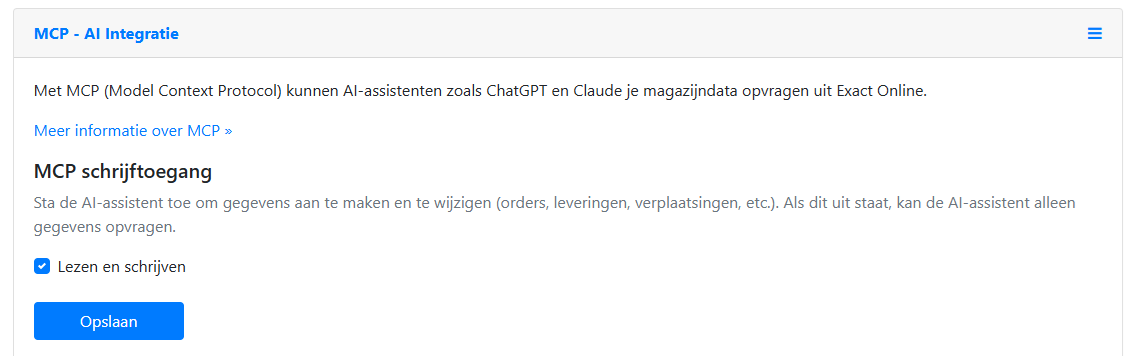
If the AI assistant tries to modify data while read-only mode is active, it receives a clear error message and the action is blocked:
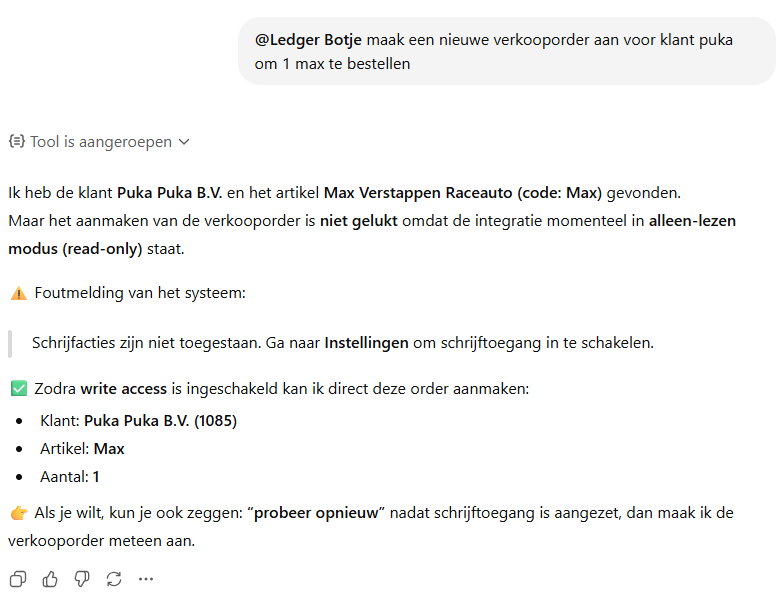
This gives you full control over what the AI can and cannot do in your Exact Online administration.
Go to Settings → MCP - AI Integration and check "Read and write" to enable write access:
If the AI assistant tries to modify data while read-only mode is active, it receives a clear error message and the action is blocked:
This gives you full control over what the AI can and cannot do in your Exact Online administration.
The risk is limited because writing is off by default. As long as the connection is in read-only mode, the AI assistant is only offered read tools and cannot create, modify or delete anything. Only when you deliberately enable write access (with the Advanced plan) do write and delete tools become available. Delete actions are real and irreversible in Exact Online; they are marked as "destructive" so your AI assistant asks you for confirmation first. You can switch back to read-only at any time. Always check important actions yourself.
Would you like to exercise your right to access, rectification, erasure, restriction, portability or objection under the GDPR (art. 15-22)? Send a message via our contact form and put "GDPR request" in the subject line. Specify which right you wish to exercise, your full name, your email address and – if known – the organisation that uses Ledger Botje. We will respond within 30 days in accordance with art. 12 GDPR. As we often act as a processor on behalf of our Customer, we may forward your request to the data controller (the organisation using Ledger Botje) where appropriate. See also our privacy statement.
Pricing
Ledger Botje offers three plans: Basic for €39 per month (read only, max 1 administration, 5,000 requests/month), Advanced for €59 per month (read and write, max 10 administrations, 8,000 requests/month) and Enterprise on request. With annual subscriptions you receive a discount.
Yes. Your 14-day trial gives you full Advanced-level access, including write actions and up to 10 administrations. Write access is off by default; you switch it on yourself in the settings. No credit card or payment details required, and you are not tied to anything. After the trial you choose Basic or Advanced yourself.
The AI connection works with any paid plan (Basic or Advanced) and during the free trial period. With Basic you can query data (read-only); with Advanced you can also perform actions in Exact Online, such as creating orders, invoices and deliveries. Not sure which plan suits you? See the pricing page or contact us.
With Basic you can only query data from Exact Online (read-only). With Advanced you can also create and edit data, such as creating orders, warehouse transfers, goods receipts and customer accounts. Advanced also offers more administrations (10 vs. 1) and more AI requests per month (8,000 vs. 5,000).
Yes, you can upgrade from Basic to Advanced at any time. When upgrading, you immediately get access to the extra features. Downgrading is possible at the end of your billing period.
Every time your AI assistant performs an action in Ledger Botje – for example looking up stock, creating an order or retrieving an overview – counts as one AI request. A single question in the chat can therefore use several requests if the assistant needs to retrieve multiple pieces of data to compose your answer. Requests are counted per month and apply to your entire connection, even if you use multiple AI assistants. With every answer Ledger Botje reports how many requests you have left this month, so your assistant can adjust its pace.
When you have used up your monthly requests, you receive a notice and new AI requests are blocked until the start of the next month. You can upgrade to a higher plan at any time or add an add-on with extra AI requests to continue right away. Your stored data and connection remain intact.
Plans scale with the number of Exact Online administrations you connect, not with the number of users or devices. One connection can be used with multiple AI assistants and devices at the same time; the administration and request limits apply jointly to that connection. If you need more administrations, you can expand the number with add-ons. See the pricing page for the current limits per plan.
The cost of connecting Exact Online to AI via Ledger Botje starts at €39 per month for the Basic plan (read-only) and €59 per month for Advanced (read and write). There are no setup fees or hidden costs. You can try Ledger Botje for free first. See the pricing page for a full overview.
No, you don't need any knowledge of the Exact Online API. Ledger Botje uses the MCP protocol, which means your AI assistant automatically makes the correct API calls. You simply ask questions in plain language and Ledger Botje translates them into the right Exact Online API requests. No programming knowledge or technical experience is required.
Can't find your question?
Contact us or try Ledger Botje for free and find out for yourself.
Try free Contact us