For years, business intelligence on Exact Online meant the same thing: a connector, a data model, a consultant, and a dashboard after roughly five weeks. Now that you can connect your administration to an AI assistant, the question has changed. Not which BI tool, but: do I still need one?
This article gives an honest answer — including the cases where the answer is still yes.
What is business intelligence, really?
Business intelligence (BI) is collecting, combining and presenting company data so you can make decisions on it. In practice it splits into two very different things that often get lumped together:
- Fixed reporting. The same figures, every week, for the same people. A revenue dashboard the management team opens on Monday morning.
- Ad-hoc analysis. The question that comes up today and for which nobody is going to build a dashboard. “Which customers from last year top 20 have not ordered anything yet this year?”
The classic BI stack is built for the first and poor at the second. That is exactly where the opening is. More terms from this field are in the glossary.
Why classic BI on Exact Online stalls
The technology works fine. The problem is everything around it.
- The data model is work. A connector hands you raw tables: general ledger entries, sales lines, items. A model has to go on top of that before a usable figure comes out. BI vendors themselves quote four to six weeks before the first dashboard goes live (as stated by Dutch Exact Online BI vendors, July 2026).
- A licence per user comes on top. On top of the connector and the build, you pay for every person allowed to view the dashboard.
- Someone has to maintain it. A new ledger account, an extra warehouse, a changed cost centre structure: the data model is forever catching up with the administration.
- Every new question is a request. Whatever is not in the dashboard has to be built in. That is why most ad-hoc questions end up in Excel anyway.
The pattern is familiar: the dashboard is live, everyone is happy, and six months later the controller is still exporting to Excel for everything it does not cover.
BI through a conversation: what that looks like
With the Ledger Botje connection you put the question straight to your AI assistant. It pulls the figures from your Exact Online administration and builds the analysis on the spot.
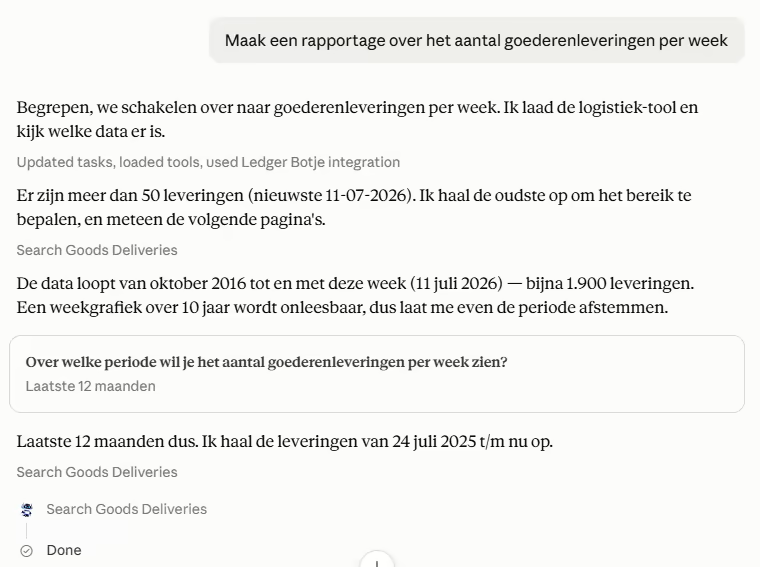
The assistant finds nearly 1,900 deliveries going back to 2016 and first asks which period you mean.
Look at what happens here, because that is the whole difference with a dashboard. It does not blindly produce a ten-year chart. The assistant establishes how large the dataset is, sees that the question is too broad, and scopes it with you. That is what an analyst does, and what a fixed dashboard by definition cannot: a dashboard shows what was built into it, whether or not that answers your question.
Then the result follows — a worked-out overview you adjust in the same conversation. Different period, extra breakdown, underlying figures as a table. What such a report looks like in practice is covered in building reports with Claude Desktop.
BI tool or AI connection: the comparison
| Aspect | Power BI connection on Exact Online | Ledger Botje (MCP) on Exact Online |
|---|---|---|
| Time to first insight | Four to six weeks (data model plus dashboards) | Same day, once connected |
| Answering a new question | Change the dashboard, or have it changed | Ask the question |
| Maintenance | Data model follows changes in the administration | None; the connection reads the administration as it is |
| Cost model | Connector plus implementation plus licence per user | Fixed subscription from €39 per month |
| Multiple source systems | Strong point: merged in a data warehouse | Limited: focused on your Exact Online administration |
| Fixed reporting for a group | Strong point: everyone sees the same screen | Per user, per conversation |
| Ad-hoc analysis | Weak point: falls back to Excel | Strong point: that is what it is for |
When you do need a BI tool
There are three situations where the honest answer is: get a BI tool.
- You consolidate several source systems. Exact Online plus a webshop plus time tracking plus a CRM, in one consolidated picture. That needs a data warehouse, and that is precisely what BI was invented for.
- You keep history outside your ERP. If you want to compare ten years of figures in a way your administration itself does not support, that data belongs in a separate model.
- Dozens of people read the same screen every day. A shared dashboard with fixed definitions is then an advantage, not a burden. You specifically do not want everyone computing their own version of “revenue”.
If none of that applies — and it does not for the vast majority of smaller companies with a single Exact Online administration — you are paying for infrastructure that does not answer your question.
The two are not mutually exclusive, by the way. A common pattern: the BI dashboard stays for the fixed monthly reporting, and the AI connection takes over everything that used to require an Excel export.
What you can ask today
Five analyses that work with no preparation at all once the connection is in place:
- “Put revenue per month for this year next to last year and name the three biggest differences.”
- “Build an ageing analysis of my outstanding receivables in 30-day buckets.”
- “Which customers from my top 20 last year have not ordered anything yet this year?”
- “What is my stock value per warehouse, and which items have not moved for over 180 days?”
- “Compare margin per project against budget and show only the overruns.”
More examples are in the prompt library. If you want to look forward rather than back, read how to forecast cash flow with AI.
Is this safe?
Yes, and it is a fair question for financial data. The connection is read-only by default: the assistant reads and analyses but posts nothing unless you enable write access per user. It runs over OAuth 2.1, so Ledger Botje never receives your Exact Online password, and you revoke access with one click. Your administration is not used to train models. The full explanation is on the security page and in the security explainer.
How does this compare to an API connection?
A BI connector and an AI connection both talk to the same Exact Online REST API. The difference is who formulates the question: with a connector a developer does it once, up front, in code. With an MCP connection you do it, every time, in plain language. We work that distinction out in MCP versus the Exact Online API and in MCP versus iPaaS. An overview of all comparisons is on the comparison page.
Getting started
- Connect Ledger Botje to your Exact Online through OAuth — one click, free to try for 14 days.
- Add the MCP server to your AI assistant following the setup guide.
- Ask your first question. Start broad and let the assistant scope it with you.
Check the pricing, or first read how AI accounting in Exact Online works and how to generate reports from Exact Online with AI.